Friday, 19 February 2016

Download New IPSW to solve error 53 iOS 9.2.1 build 13D20

You can download iOS 9.2.1 build 13D20 from the links below:


This IPSW solve error 53 during restore but not make fingerprint work properly.

Apple Allow to bypass Security check for fingerprint with error 53 new IPSW released

About error 53


After you try to update or restore your iOS device in iTunes on your Mac or PC, you might see error 53 in iTunes and "Connect to iTunes" on your device. Error 53 appears when a device fails a security test. This test was designed to check whether Touch ID works properly before the device leaves the factory, and wasn’t intended to affect customers.

For anyone who experienced error 53, Apple has released an update to iOS 9.2.1 to allow you to successfully restore your device using iTunes on your Mac or PC. Use the steps in this article to restore and recover your device. If you believe that you paid for an out-of-warranty device replacement based on an error 53 issue, contact Apple Support to ask about reimbursement.


Source :  https://support.apple.com/en-au/HT205628 

Link Download New IPSW 9.2.1 

Enter DFU Mode iPhone / iPad / iPod with simple step

Enter DFU Mode iPhone / iPad / iPod


DFU mode is Bootloader Mode in iDevices, you can force DFU with this step
  • Make Sure iDevices have enough battery ar lest 50%.
  • Make Sure Power And Home Button Work Properly .
  • Press Power and Home Button Same Time 10s
  • After 10s release power button and still hold home button 15
  • Done your Phone Have  in Bootloader mode / DFU

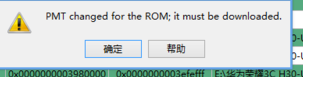
Solution PMT changed for the rom, it must be downloaded for MTK Smartphone

PMT is Partition Manger Table use for repartition and scat for firmware, if you flash with flash tool and get error " PMT changed for the rom, it must be downloaded " I have 2 solution for it.


  1. Use Firmware -> Update Button 
If you dont have backup for NVRAM / IMEI you must use this button, this button will be read NVRAM / IMEI or secure data from phone and write automatically to phone after write firmware success, but in other case this phone get bootloop cos different partition for secure data or firmware, try enter recovery and wipe manual, if phone same case try format button.

Use Format Button and Download Again 
This Option will be erase all data from phone include firmware and secure data IMEI, if you dont have backup imei you dont do it . After Click Format, Click Download Again. Power in try check IMEI with Dial Phone *#06#.
    HOW Backup IMEI MTK FROM Bootloop phone Click here
    How Solve invalid IMEI in MTK with Box Flasher.
    How Solve invalid IMEI in MTK without Box Flasher
     
Link Will update soon